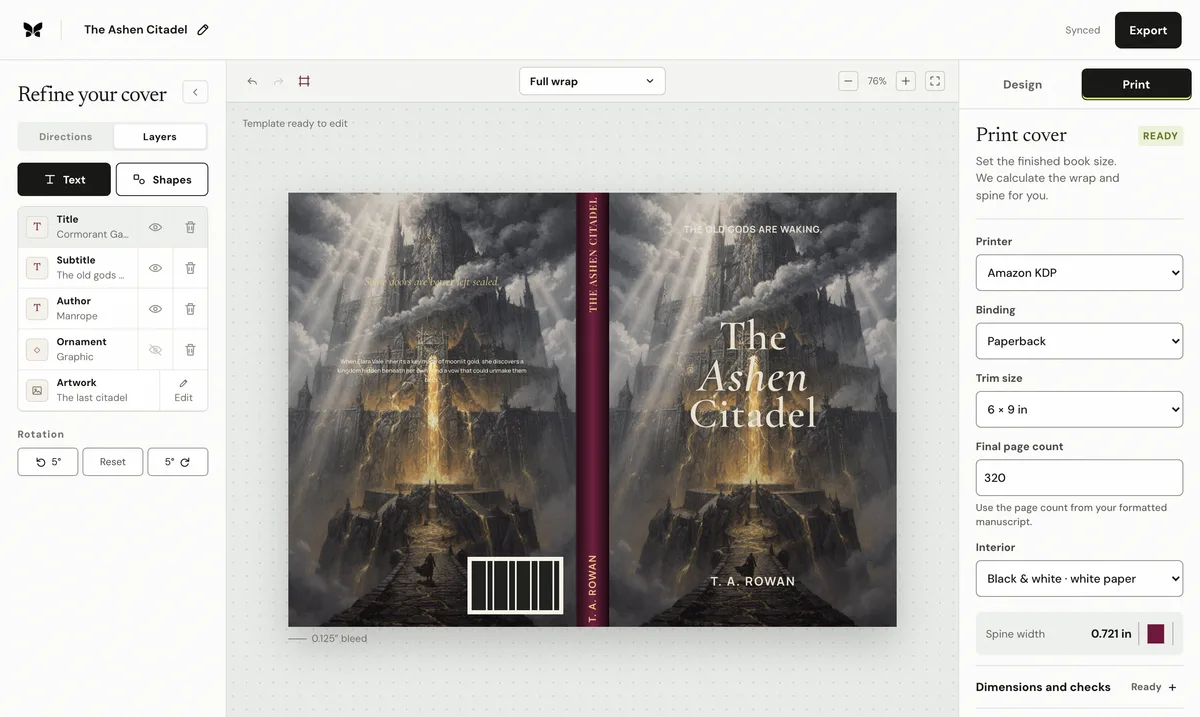
An ebook cover is one rectangle. A print cover is a manufacturing sheet containing the back, spine, front, bleed, safe zones, and, depending on the binding, hinges or wrap allowance. The artwork can look finished while the exported file is still impossible to print correctly.
Start with the physical specification
Choose the printer, binding, trim, interior paper, and final formatted page count before polishing the wrap. Those inputs determine the complete sheet. A 6 × 9 inch front is only one panel; it does not describe the back, spine, or outer bleed. If pagination changes after the cover is built, recalculate rather than stretching the design.
Let the spine be calculated, not guessed
Spine width is a production result. It changes with page count and the thickness of the selected paper stock, which means two books with the same trim and manuscript length can need different cover widths. Thin books may not safely support spine text. Keep lettering centered inside the printer's safe area and avoid precise color boundaries on either fold.
Design the back as a reading surface
Continuity does not require mirroring the busiest part of the front. Extend atmosphere, texture, or color across the wrap, then create a calmer field for the hook, blurb, review quotes, publisher mark, and barcode zone. Read the copy at actual print size. A narrow measure and deliberate paragraph spacing matter more than decorative ornaments.
Preflight the file, not the mockup
A three-dimensional mockup proves that the concept looks attractive, not that the PDF is valid. Check the exact MediaBox dimensions, effective image resolution, bleed coverage, safe text, fold clearance, barcode space, and spine-text eligibility. Compare the final export with the provider's newly generated template every time the production inputs change.
By Coverfairy Editorial · Published · Updated