

Free KDP cover calculator and template
Calculate your KDP cover size and spine width, then download a PNG or PDF cover template with the bleed, spine, safe area and barcode area marked.
Get the exact KDP wrap size
Calculated from KDP's current paperback formula. Confirm against your printer's generated template before upload.
Templates show the bleed, trim, spine, fold zones, safe area and barcode area at full size. Put the template on a layer under your artwork, then hide it before export.
Sources: Amazon KDP cover calculator and formulas · Amazon KDP cover preparation. Reviewed ; recheck the official page before production.
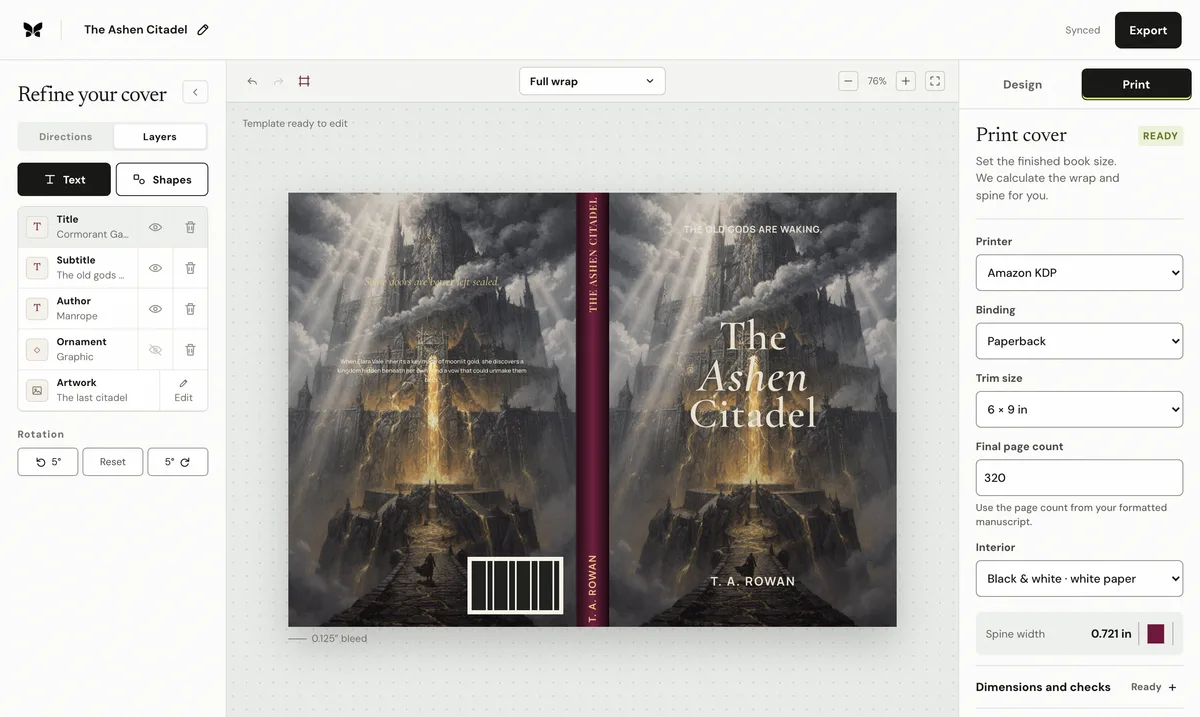
Quick answerA KDP cover calculator turns the final trim size, paper, binding, and even page count into the exact spine and full-wrap dimensions. For paperback, the sheet is the back cover plus spine plus front cover, with 0.125 inches of outer bleed on each side and on the top and bottom. Download the result as a PNG or PDF template with the bleed, spine, safe area and barcode area marked
What is the KDP paperback spine-width formula?
Multiply the final page count by the paper-specific thickness: 0.002252 inches for black-and-white white paper and standard color, 0.0025 for cream paper, or 0.002347 for premium color. A 300-page white-paper paperback therefore has a 0.676-inch spine before the front and back panels are added.
Which inputs must be final before you calculate?
Use the formatted interior's even page count, not a manuscript estimate. Select the actual trim, binding, and paper that will be chosen in KDP. If pagination, paper, trim, or binding changes, recalculate the cover and regenerate the production file.
How should you verify the calculated cover?
Download the PNG or PDF template for planning, then compare the final exported PDF with KDP's current generated template. Confirm the PDF page size, outside bleed, folds, barcode clearance, spine text threshold, and safe space around every important word or face.
How do you get a KDP cover template?
KDP produces an official template once a title's trim, ink and paper, binding and page count are entered. This calculator applies the same published geometry, for example 0.002252 inches of spine per page on white paper and 0.125 inches of bleed on each outside edge, so you can download a working template straight away, keep designing while the interior is formatted, and regenerate it the moment the page count changes.
What does the template show?
The PNG and PDF templates mark the bleed, trim, folds, spine, a safe area for words and faces, and KDP's 2 × 1.2-inch barcode area on the back panel. Fold zones show the 0.0625 inches either side of each fold that KDP allows for binding variation, so keep hard edges and lettering away from them. The PNG downloads at up to 300 DPI for Canva and Photoshop; larger templates may use a lower resolution. The PDF keeps the exact sheet size in Affinity and Illustrator.
Look up common KDP dimensions
Compare seven common paperback trims across common page counts, with white- and cream-paper spine widths and complete wrap sizes calculated by the same engine.
Open the dimensions explorerFrequently asked questions
How is KDP spine width calculated?
Page count is multiplied by the paper-specific thickness. White and standard color use 0.002252 inches per page; cream uses 0.0025; premium color uses 0.002347.
Does the calculator include bleed?
Yes. Paperback output includes 0.125 inches on the top, bottom, and both outside edges.
Can I download a KDP cover template?
Yes. Download a PNG or PDF template at the full sheet size with the bleed, trim, spine, fold zones, safe area and barcode area marked. Put it on a layer under your artwork and regenerate it whenever the trim, paper, binding or final page count changes.
Is this the same as KDP's official template?
No. KDP generates a template for the exact title once its setup is entered. This calculator uses KDP's published formulas so you can plan and design straight away, then compare the finished PDF with KDP's template before upload.