The ebook job
The ebook cover is the retail tile and library thumbnail. It must stay legible on a phone, signal the category immediately, and load as a clean RGB raster image. Amazon's ideal Kindle cover is commonly 2,560 × 1,600 pixels at a 1.6:1 height-to-width ratio. There is no value in adding printer marks, a spine, or a mockup frame to this file.
The print job
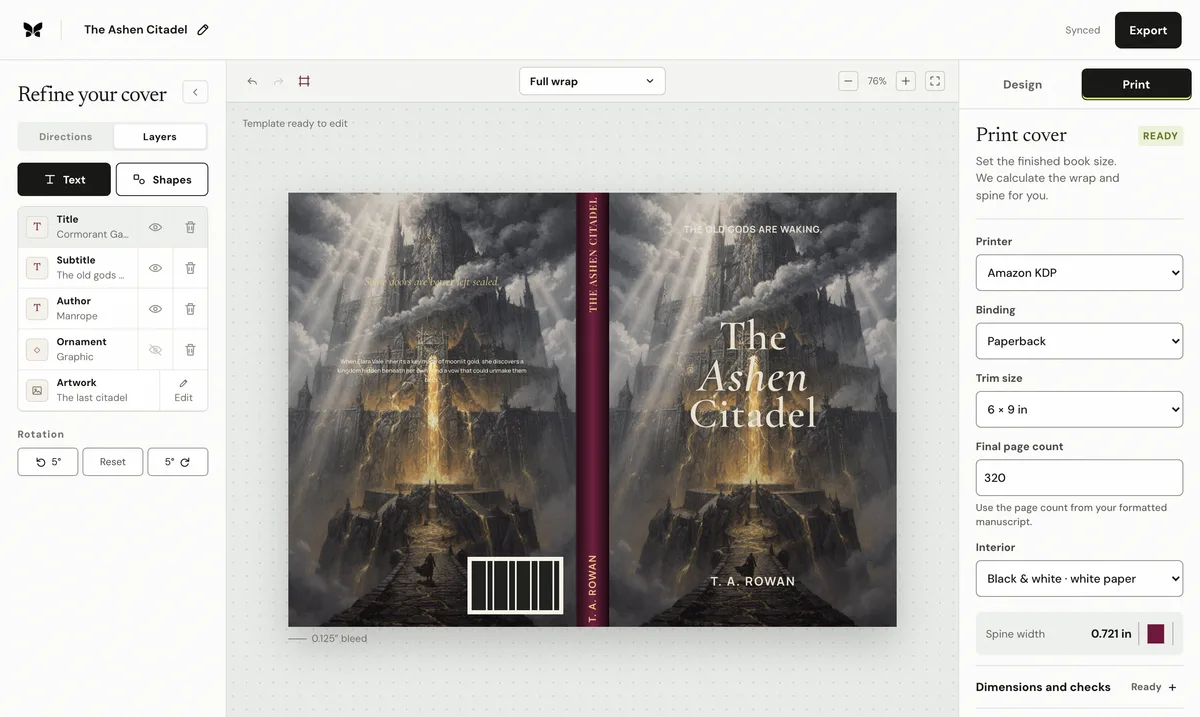
The printer needs manufacturing geometry, not just marketing art. A paperback PDF runs back–spine–front and includes outside bleed, safe areas, fold tolerance, and a reserved barcode location. A case-laminate hardcover adds board, hinge, and wrap allowances. The full sheet can only be finalized after the interior produces the actual page count.
How one design becomes both
Treat the approved front as the identity, then extend the system. Continue the palette, texture, or environment across the spine into a quieter back panel; set the blurb and optional author material at a comfortable physical reading size; and reserve the barcode. Keep the title, subtitle, and author as editable layers so the front can be tuned independently for thumbnail, print, audiobook square, and launch formats.
The mistakes caused by treating them as one file
Uploading a front-only JPG as a print cover omits the spine and back. Uploading a complete wrap as the ebook cover produces a tiny, unreadable strip. Stretching the ebook art across the wrap distorts the focal point, while guessing the spine before formatting makes the fold lines wrong. Build from one editable project, but export each format to its own verified specification.
Published by Coverfairy Editorial. Sources: Amazon KDP paperback cover setup · Amazon KDP ebook cover image guidance. Reviewed ; recheck the official page before production.