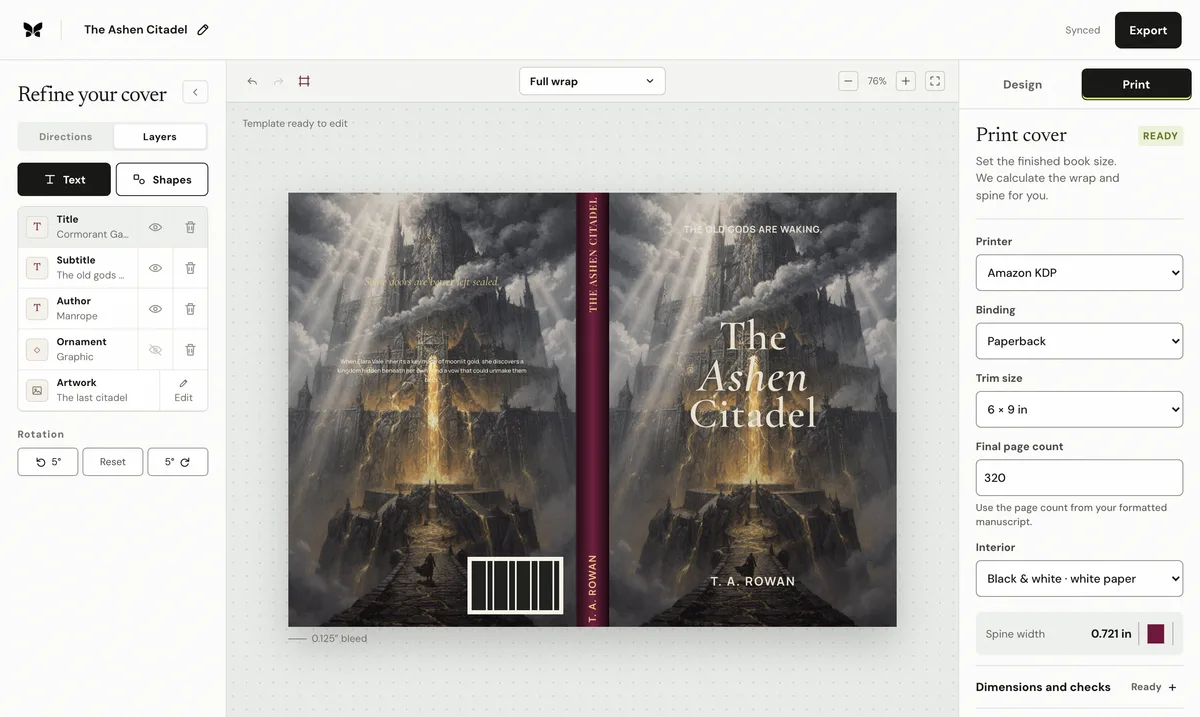
The paperback PDF
The paperback upload is one wide page ordered back–spine–front for left-to-right books. Its physical MediaBox must match the calculated sheet, the background must reach every bleed edge, and important type must stay inside the safe zones. Flattening complex effects and embedding fonts prevents substitutions, but flattening does not excuse a low-resolution source image.
The hardcover PDF
KDP's case-laminate hardcover also uses one PDF, but its geometry is not a wider paperback. The sheet includes board, hinge, spine, and wraparound areas supplied by the hardcover template. Reusing a paperback PDF or stretching it until the outside dimensions look close moves the folds and produces an invalid case.
The Kindle cover image
An ebook has no physical back, spine, bleed, or barcode zone. Upload only the front design as a clean RGB JPEG or TIFF. KDP's ideal Kindle proportion is 1.6:1 height to width, commonly 2,560 pixels high by 1,600 wide. Keep the title readable at a much smaller storefront thumbnail even though the source file is large.
The final preflight
Open the exported print PDF and read its actual page size, not just the filename. Overlay the current KDP template, inspect every edge for continued artwork, check spine eligibility and barcode clearance, and zoom into the title and faces for effective resolution. Then inspect the separate ebook file at retailer-thumbnail size; passing print preflight does not prove the front works on screen.
Published by Coverfairy Editorial. Sources: Amazon KDP paperback cover setup · Amazon KDP ebook cover image guidance. Reviewed ; recheck the official page before production.