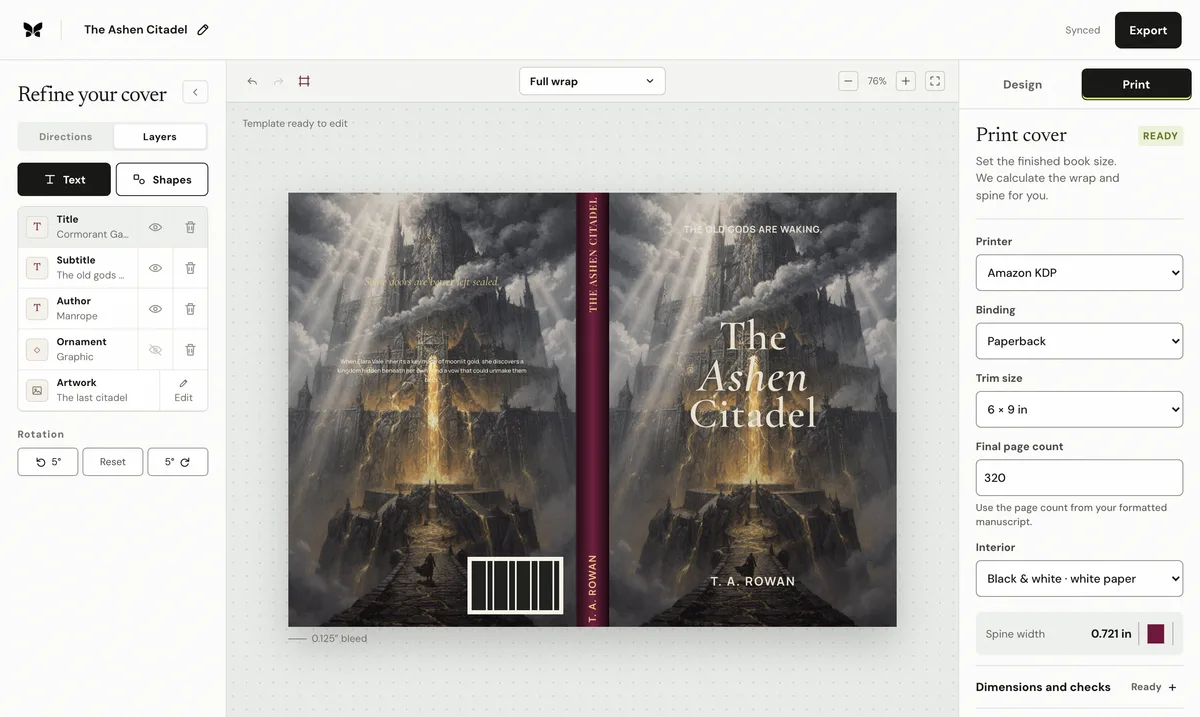
A KDP cover calculator turns production choices into the width and height of a complete print-cover file. The useful result is not only the spine width. It is a full wrap built from the back cover, spine, front cover, bleed, and any binding-specific allowances. Accurate inputs matter more than manual arithmetic.
What does a KDP cover calculator need?
Start with the exact binding, trim size, interior ink and paper, reading direction, and final formatted page count. These are production inputs, not design preferences. A manuscript word count cannot substitute for pagination because font, leading, margins, chapter starts, illustrations, and opening pages all change the number of printed pages. KDP also limits which trim and page-count combinations are available, so validate the combination before designing around it.
How are paperback cover dimensions calculated?
For a paperback, the total width combines the back, calculated spine, front, and bleed on both outer edges. The total height combines the trim height and top-and-bottom bleed. Spine width depends on page count and the selected interior paper profile. Keep the component values visible: a single unexplained width is harder to audit when a page count or paper choice changes.
When should you download a fresh KDP template?
Use the calculator for planning and generate the current official KDP template before the final preflight. Place that template over the exported wrap and inspect bleed, trim, folds, spine safe areas, and barcode clearance. Regenerate both the calculation and provider template after any change to pagination, paper, trim, or binding. Do not stretch an old file until it appears to fit.
What should you check before uploading the PDF?
Confirm the PDF page size matches the calculated sheet, artwork reaches every bleed edge, important text stays inside safe areas, the spine is eligible for text, and no critical detail enters the barcode zone. Check effective image resolution after cropping, not only the source-file dimensions. A three-dimensional mockup is a marketing preview; it cannot prove that a print PDF meets the production specification.
By Coverfairy Editorial · Published · Updated