

Every printed book in a shop carries the same kind of barcode. It lets a till, a warehouse or a library scan exactly which edition is in hand. For a self-published book that can sound like one more thing to buy. It is not: once the edition has an ISBN, the barcode is simply that number written as bars.
What the numbers under the barcode mean
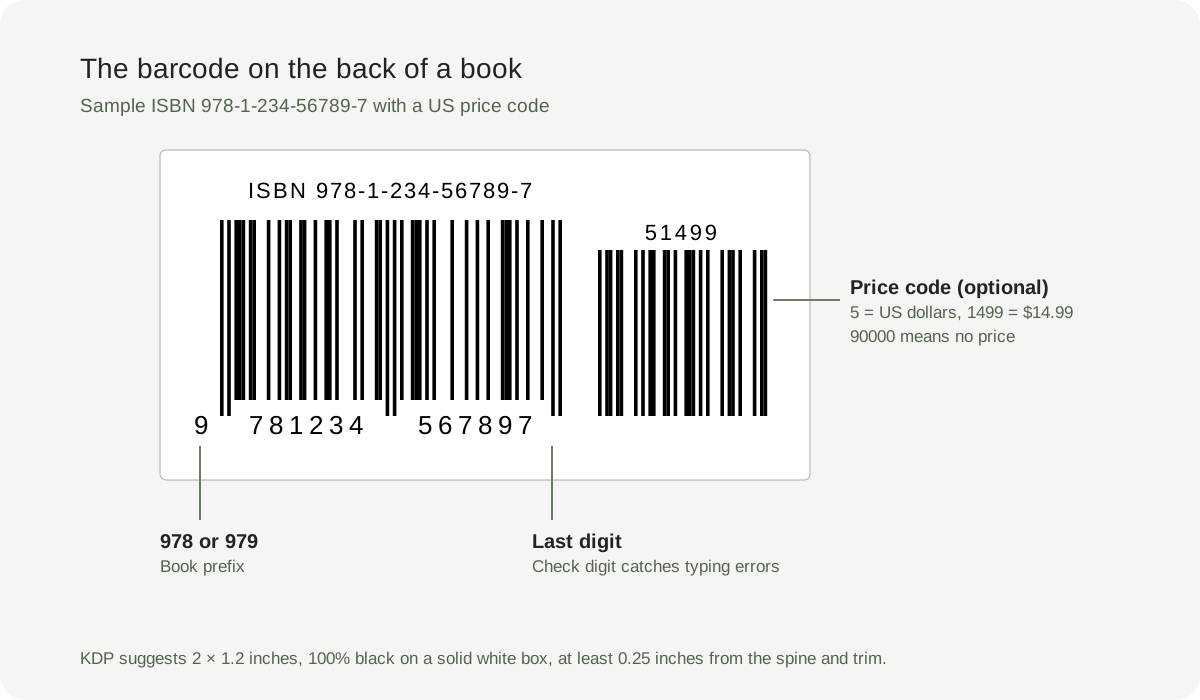
The digits beneath the bars are the ISBN-13. Book ISBNs begin with 978 or 979, the prefix that marks the code as a book. The middle digits identify the registration group, the publisher and the title. The last digit is a check digit calculated from the others, so a scanner can catch a mistyped number. A smaller barcode to the right, when there is one, is a five-digit price code: a leading 5 means US dollars, so 51499 means $14.99, and 90000 means no price is encoded.
Step 1: get an ISBN for this edition
The barcode can only be as correct as the ISBN behind it. Each print format needs its own ISBN, so a paperback and a hardcover have different numbers and different barcodes. In the US, ISBNs are sold by Bowker; other countries have their own national agencies, and some issue ISBNs free. KDP also offers free ISBNs for paperbacks and hardcovers. A free KDP ISBN lists Independently published as the imprint and can only be used with KDP.
Step 2: decide who adds the barcode
On KDP you can upload a cover with or without a barcode. If you leave it out, KDP places one on the back cover for you, in the lower right corner of a left-to-right book, so keep that corner clear of text and important artwork. If you supply your own, it must match the book's ISBN exactly. IngramSpark requires a barcode on the back cover; generate its title-specific cover template and follow the current barcode instructions there. Other printers have their own rules, so check before you export.
Step 3: make the barcode from your ISBN
Any accurate EAN-13 generator can draw the bars; you do not need to pay for the barcode itself. Coverfairy's free ISBN barcode generator checks the check digit, accepts an ISBN-13 or ISBN-10, and downloads a vector SVG that stays sharp at any size. KDP prefers vector barcodes and asks for 300 PPI if you use a raster image. The generator draws the ISBN barcode without a price code. Compare the digits under the bars with your ISBN record before you place it.
Place it where it will scan
KDP suggests a barcode about 2 × 1.2 inches, with a minimum of 1.4 × 0.8 inches. Keep it at least 0.25 inches from the spine and the trim edge, in 100% black on a solid white box, right-side up and square to the cover. Do not stretch it, place it over a photo or gradient, or let text touch it. A price code, if you include one, must match the book's list price. A QR code can go elsewhere on the back cover, but not in the barcode space.
When you do not need a barcode
Ebooks do not carry a printed barcode, so you only need the ISBN if the store asks for one. Copies printed for friends, events or your own records do not need one either, unless a shop or distributor asks. If you plan to sell the print book through stores later, leave room for the barcode from the start so the back cover does not need a new layout.
Sources and verification
- Amazon KDP: barcodes
- Amazon KDP: create a paperback cover
- Amazon KDP: get an ISBN
- International ISBN Agency: what is an ISBN?
Requirements can change. Check the linked instructions before you publish or upload a file.
By Coverfairy Editorial · Published · Updated