KDP will not convert a cover above 650 MB and recommends a file of 40 MB or less. Remove hidden data and optimize the PDF without shrinking the cover below its required dimensions or effective image resolution.
Verified against current KDP guidanceKDP's current paperback and hardcover cover guides say files larger than 650 MB will not convert and recommend 40 MB or less. They also call for optimized PDFs, flattened transparency, embedded fonts, and removal of printer marks and template material.
Reviewed by Coverfairy Editorial on . Recheck the linked KDP source before production because platform rules can change.
KDP says my cover file is too largeKDP will not convert a cover above 650 MB and recommends a file of 40 MB or less. Remove hidden data and optimize the PDF without shrinking the cover below its required dimensions or effective image resolution.
Why this happens
A print cover can become unnecessarily large when it contains unflattened working layers, duplicate or cropped-out images, excessive image resolution, embedded editing data, unused color information, or an inefficient PDF export. Repeatedly compressing the finished cover as a JPEG may reduce size, but it can also damage type and artwork before the real cause is removed.
The complete manual fix
Keep an untouched editable source, then export a separate production PDF. Do not optimize the only working copy.
Remove hidden layers, off-canvas objects, unused alternate images, annotations, attachments, crop marks, color bars, and template instructions.
Flatten transparency and artwork for the production file, while keeping title and author type crisp in the source. Embed the fonts used by the export.
Downsample only images that materially exceed the resolution needed at their final placed size. Preserve at least 300 DPI for cover artwork and inspect the effective resolution after scaling.
Use the PDF exporter's optimization setting, then confirm that the result is one unlocked page containing back, spine, and front at the exact full-cover dimensions.
Inspect the optimized PDF at high zoom and compare it with a fresh KDP template before uploading the unchanged file.
Keep the evidence
Save KDP's written notice, the unchanged exported file, the selected print settings, and the template used for comparison. Those records make a support case reproducible, and they are what the technical spec guarantee asks for.
Recalculate before rebuilding
Spine width0.757 in
Full cover13.007 × 9.250 in
At 300 DPI3,902 × 2,775 px
Spine textAllowed
Calculated from KDP's current paperback formula. Confirm against your printer's generated template before upload.
Templates show the bleed, trim, spine, fold zones, safe area and barcode area at full size. Put the template on a layer under your artwork, then hide it before export.
Already have a front cover?
Upload it and Coverfairy builds the spine, back cover and barcode area around it at these KDP dimensions. Preview free; download the print PDF with a pass.
JPG, PNG or WebP · up to 15 MB · no account needed
The shortcut: a rebuilt wrap with the guarantee
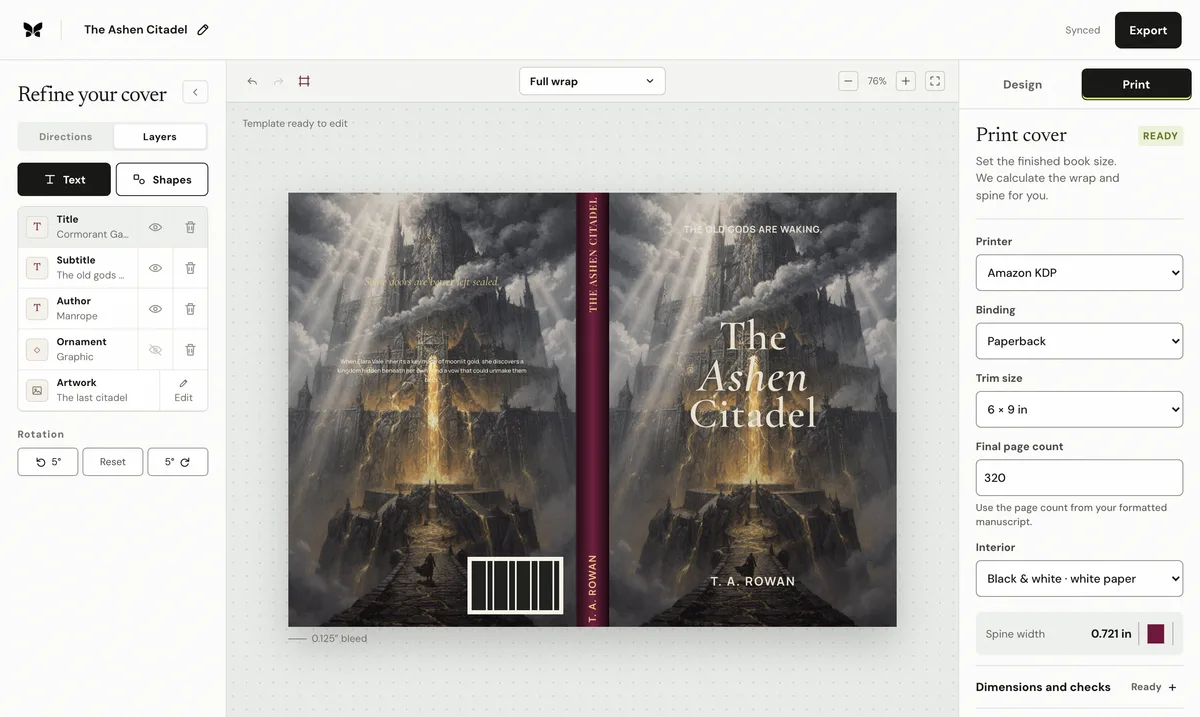
Enter the final trim, binding, paper, and page count in Coverfairy and the complete KDP sheet, spine, and bleed are recalculated while the artwork and typography stay editable. An active pass includes paperback and hardcover PDFs with live preflight checks.
The pass is covered by the technical spec guarantee: if KDP rejects an unchanged Coverfairy export because Coverfairy calculated the trim, bleed, spine, or sheet dimensions incorrectly, Coverfairy corrects the file or refunds the affected pass.
Coverfairy uses essential cookies to keep the site secure and remember your settings. With your permission, analytics and advertising-measurement cookies help us understand which journeys lead to sales. Personalized ads stay off.