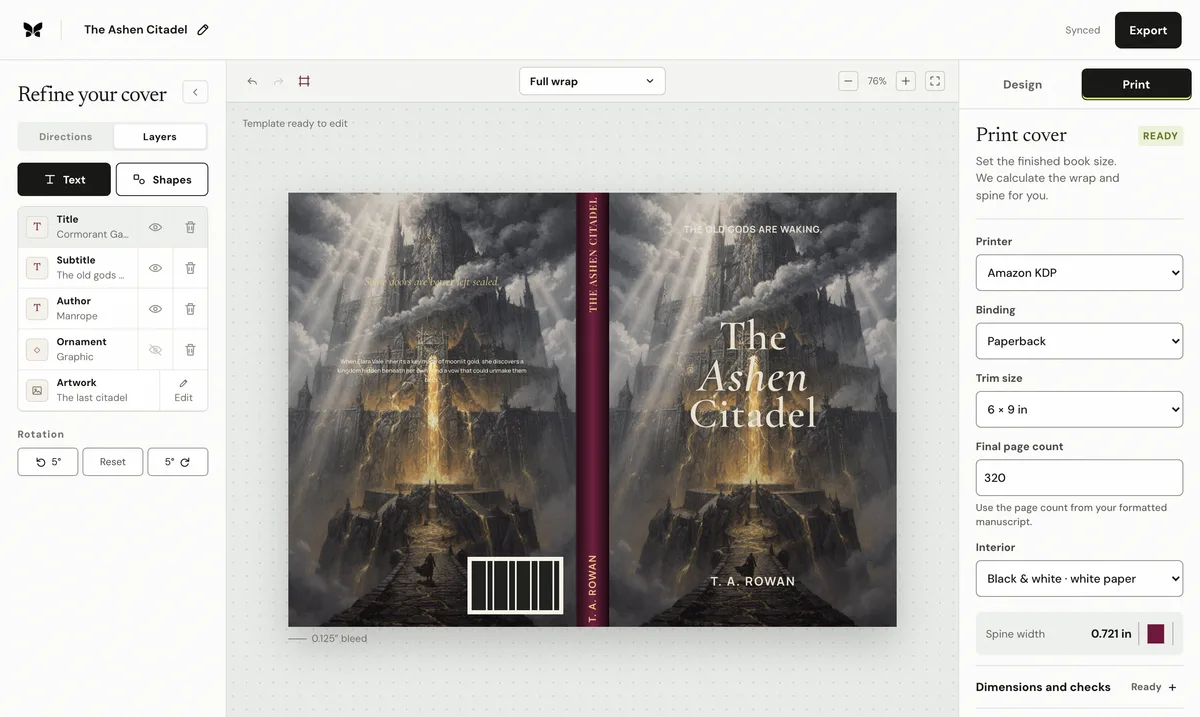
What to check
1. Use the same editable Coverfairy document, then recalculate the production sheet for each provider
Use the same editable Coverfairy document, then recalculate the production sheet for each provider.
2. Confirm trim, binding, interior color, paper, and final page count before export
Confirm trim, binding, interior color, paper, and final page count before export.
3. Keep important type and faces away from folds and provider barcode zones
Keep important type and faces away from folds and provider barcode zones.
Use the final production inputs
Calculate from the final formatted page count, not the manuscript estimate. Select the exact trim, binding, interior type, and paper stock before creating the cover sheet. If any of those values change, regenerate the dimensions and compare the exported PDF against the printer's current template.
Artwork, type, spine, and back-cover copy remain editable when the print setup changes.
Sources: IngramSpark File Creation Guide · Amazon KDP cover preparation. Recheck the current printer template before export.