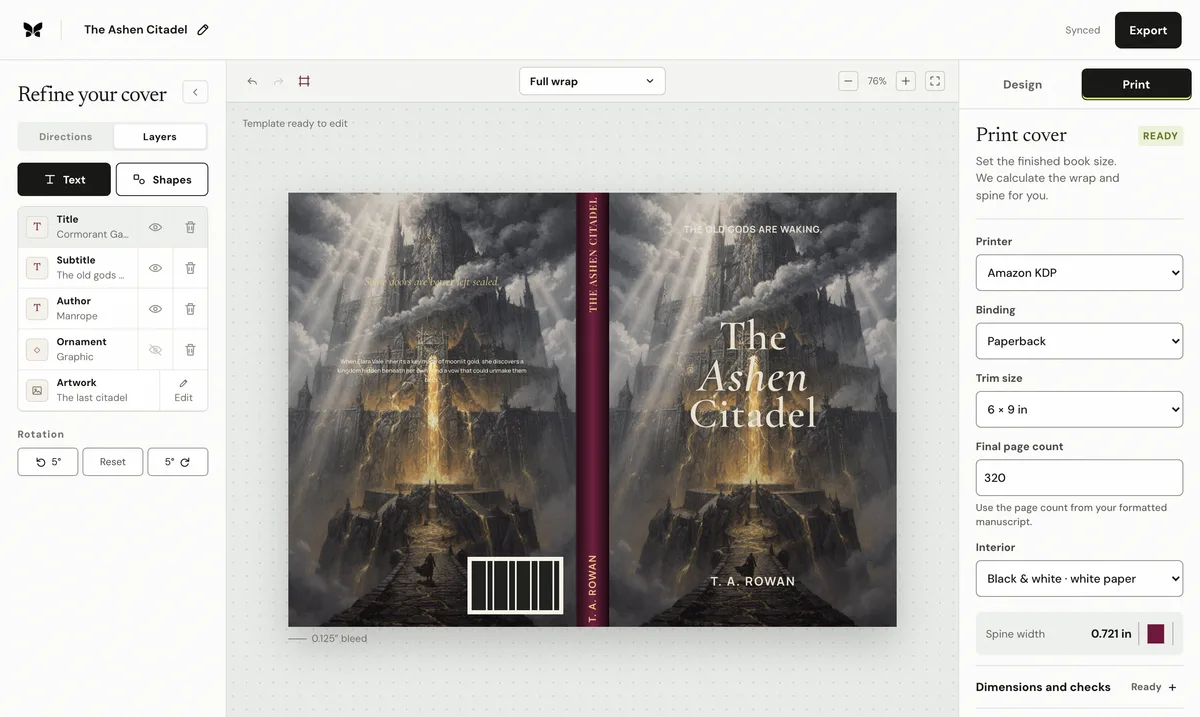
What to check
1. Recalculate after the interior is final and compare the PDF MediaBox to the expected cover dimensions
Recalculate after the interior is final and compare the PDF MediaBox to the expected cover dimensions.
2. Extend backgrounds 0
Extend backgrounds 0.125 inches past every outside trim edge and remove crop marks and surrounding white space.
3. Keep text inside safe zones, remove spine text below 80 pages, and leave the barcode area clear
Keep text inside safe zones, remove spine text below 80 pages, and leave the barcode area clear.
Use the final production inputs
Calculate from the final formatted page count, not the manuscript estimate. Select the exact trim, binding, interior type, and paper stock before creating the cover sheet. If any of those values change, regenerate the dimensions and compare the exported PDF against the printer's current template.
Artwork, type, spine, and back-cover copy remain editable when the print setup changes.
Sources: Amazon KDP cover preparation. Recheck the current printer template before export.